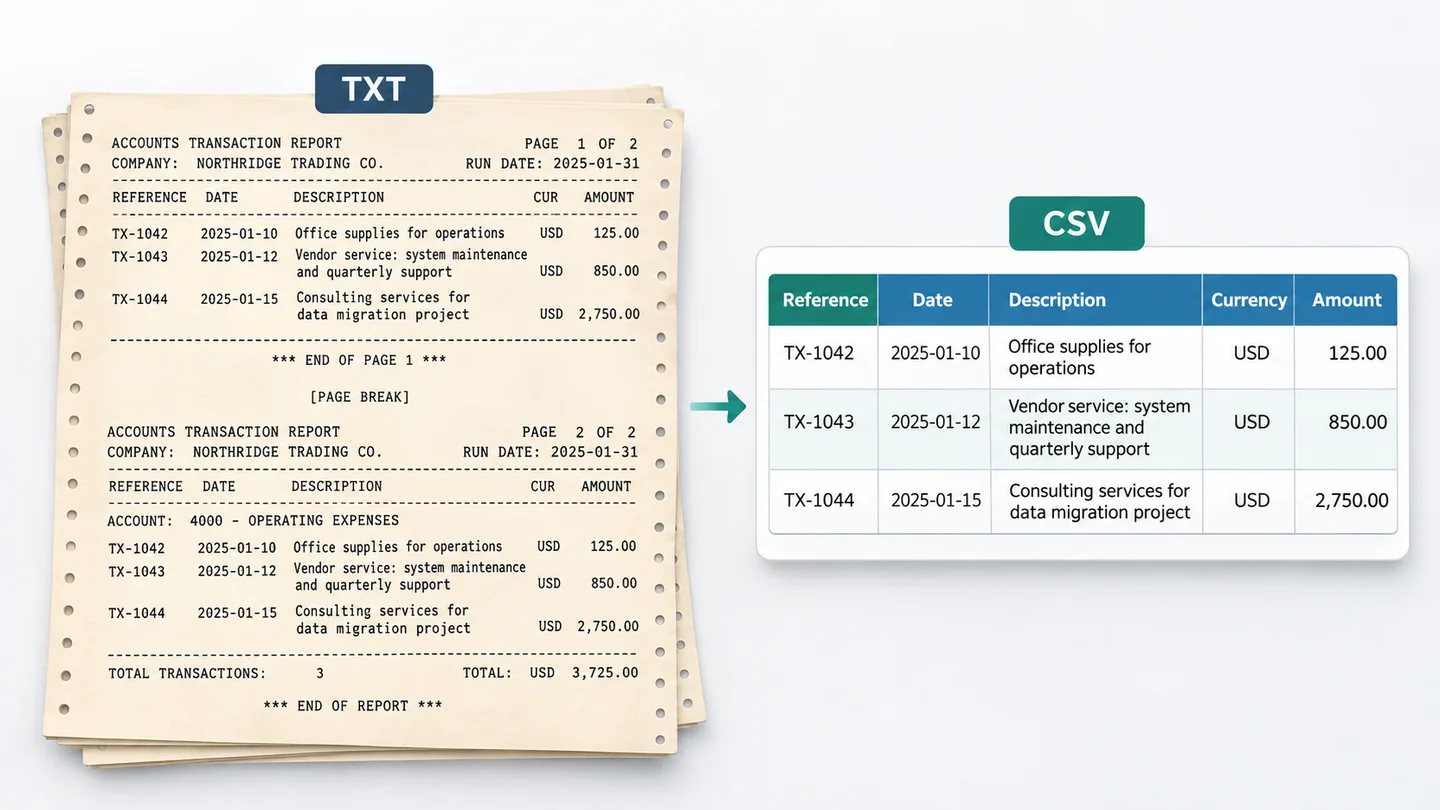
Converting Fixed-Width Text Reports to CSV
By Abhay Mishra | Updated
A legacy text report can look organized on screen while remaining difficult to import into a database. Columns may be defined by character positions rather than commas, descriptions can continue onto another line, and every printed page may repeat a heading. A reliable conversion must identify the business records within that layout. Simply splitting each line on spaces can turn a readable report into incorrect columns. Here is what to agree before building a repeatable text-to-CSV application.
Need a repeatable way to process your business files?
Get an application built around your sample files and required output. Test the conversion logic with a free trial that processes up to 5 files at a time, then receive a one-time quote for the full application to run on your own computer or company server.
Distinguish a printed line from a complete record
In a ledger, one transaction may occupy several printed lines. The first may contain a date and reference, the second a description, and a later line the amount. Report-level account details may apply to every transaction until the next account heading. Document those relationships before selecting columns. Otherwise, a converter may create blank records from continuation lines or attach a transaction to the wrong account when a page changes.
Preserve the positions that define the columns
In a fixed-width export, spaces can carry structure. A blank amount column may mean that no debit was recorded, not that the next field should shift left. Confirm the start and end positions for each field and review how the report handles longer values. If there are several layouts, identify them explicitly. Do not assume that the positions in a recent report also describe exports from an older version of the source system.
- Record the field boundaries for each supported report layout.
- Specify how a wrapped description continues the previous record.
- Keep blank fields in their correct columns instead of collapsing adjacent spaces.
- Agree on how to handle truncated or incomplete records.
Keep business information and remove print metadata
Page numbers, separator lines and repeated column headings normally describe the printed report rather than its transactions. The application should recognize these patterns without discarding useful content. A rule that removes every line containing the word 'page', for example, could delete a legitimate product description. Define which account, branch, date and currency headings are business fields that must be carried into the output, and which elements are only page decoration.
Define identifiers, dates and amounts explicitly
Account numbers and reference codes should keep meaningful leading zeros. A date such as 04/05/2026 needs a known convention before it can be standardized. Establish whether negative amounts use a minus sign, parentheses or a separate debit column. Review the file's character encoding so names and descriptions are preserved. These decisions belong in the field mapping rather than being guessed differently for each record.
Write a CSV that the destination can read
CSV output needs consistent fields and correct quoting. A description containing a comma must remain one field, not create an extra column; embedded quotes also need proper handling. Use a CSV writer rather than joining values with commas manually. Agree on the delimiter, text encoding, date convention and required column names with the receiving system. Opening a CSV in a spreadsheet and importing it into a database are separate checks, so test the actual destination as part of acceptance.
Reconcile the output against the original report
Check that every complete business record is included once and that page transitions have not created gaps or duplicates. Reconcile debit, credit or quantity totals using the source system's definitions. Keep separate currencies and accounts separate during these checks. The application should report an incomplete or unrecognized record for investigation instead of filling missing values with plausible-looking defaults.
- Check records immediately before and after each page break.
- Compare long descriptions and blank fields with their original positions.
- Review leading-zero identifiers, negative values and uncommon characters.
- Confirm totals and record counts for each relevant business group.
Use a small trial to agree on the rules
Choose representative reports from different periods and include an awkward example, such as a wrapped description or an incomplete final page. A free custom trial application can process up to five files at a time. Inspect the output against the original reports, then agree on any changes before purchasing the full version. File count alone does not describe workload: a single report may contain thousands of transactions, so discuss typical file sizes and your intended hardware too.
Make the conversion repeatable inside your business
Once the rules are agreed, the full application can run on your computer or company server and process future batches of the supported layouts. Agree on output naming, duplicate-file handling, exception reports and storage locations. The text example on this website includes a source report with repeated page headings and a CSV containing its business fields. It is a useful starting point for explaining what you need from your own reports.
Further reading
Get a custom application for your files.
Describe the files you work with and the output you need. A free custom trial lets you check the result before buying the full application. Process future batches in-house with no per-file conversion fee for the agreed formats.